
The Financials Billing Audit report is used to review billing records to find errors, inconsistencies, or compliance issues. It outputs a list of flagged billing items and summaries for follow-up or correction.
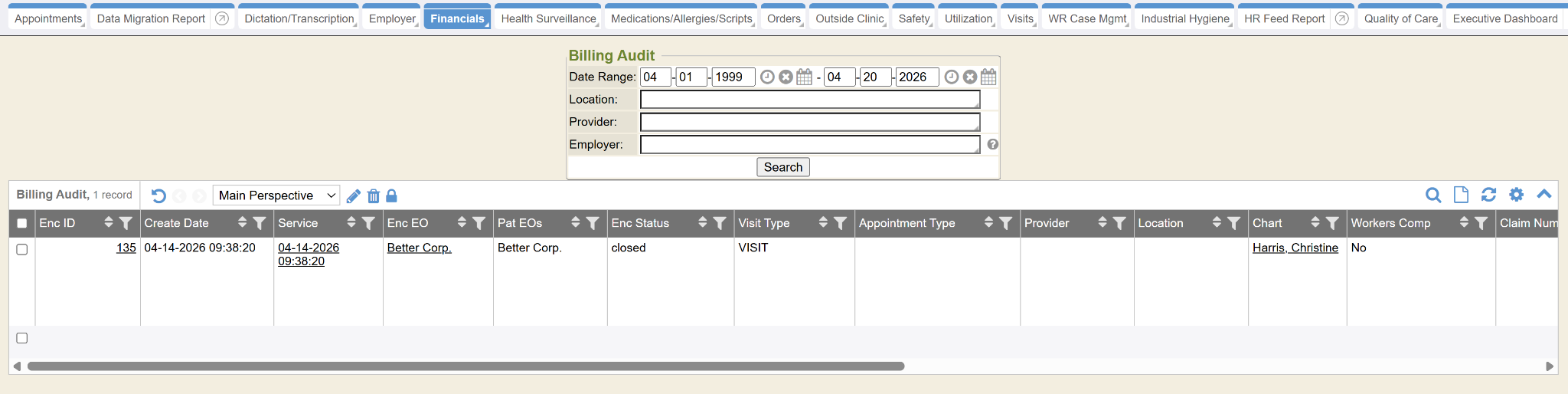
Enc ID: This column represents the Encounter ID. The Encounter ID is a hyperlink. When selected the hyperlink takes the user to the Encounter Properties.
Create Date: This column represents the date and time the encounter was created.
Service: This column represents the date and time of service.
Enc EO: This column represents the Encounter Employer Organization. A patient can have more than one Employer Organization on their chart. In the Encounter section, an Employer Organization is selected and this is reflected here.
Pat EOs: This column represents the Patient’s Employer Organizations. A patient can be part of more than one Employer Organization.
Enc Status: This column represents the Encounter Status, whether the encounter is open or closed.
Visit Type: This column represents the Visit Type. This is sometimes referred to as the Encounter Type.
Appointment Type: This column represents the Appointment Type that is tied to the Encounter, if there is one.
Provider: This column represents the Provider tied to the Encounter. This is entered within the Encounter section of the Encounter.
Location: This column represents the Location tied to the Encounter. This is entered within the Encounter section of the Encounter.
Chart: This column represents the Patient.
Workers Comp: This column represents whether the Encounter is a Workers Comp case. If it is a Workers Comp case, this column will display “Yes”. If no, it will display “No”.
Claim Number: If the Encounter is a Workers Comp case and a Claim Number was entered, it will display in this column.
Charge Name: This column represents the Charges associated with the Encounter. If there is more than one Charge, the Charges will all appear in a comma separated list in this column.
Deal: This column represents if the Charges on the Encounter are part of a Deal. If the Charges are part of a Deal, the column will display “Yes”. If the Charges are not part of a Deal, the column will display “No”.
Charge Code: This column represents any Charge Codes associated with the Orders that are part of the Encounter.
Payer: This column represents the Payer on the Encounter. This is set in the Encounter section of the Encounter.
Charge: This column represents the total of all the Charges on the Encounter.
Orders: This column represents all the Orders that are part of the Encounter. If there is more than one Order on the Encounter, the Orders will all appear in a comma separated list in this column.
Route ID: This column represents the Route ID, if there is one. If not, it will display 0.
Bill Code: This column represents the Bill Code that is assigned when Charges are added to the Deal. If there is more than one Bill Code on the Encounter, the Bill Codes will all appear in a comma separated list in this column.
Errors: This column represents the Errors that are associated with Encounter. If there are more than one Error, the Errors will be listed in this column. A user can utilize this list to correct any Encounter errors before they are sent over the interface to their billing system.